
Cloud Technology
Texas businesses are moving away from on-premise DVRs, scattered camera systems, and after-the-fact incident review. The shift is toward cloud video surveillance with live remote monitoring, AI-driven detection, and real human verification — a model that gives multi-site operators a single pane of glass, dramatically faster response times, and resilience against the storms, floods, and power outages that punctuate Texas life.
Op6 Security Services deploys, monitors, and manages cloud video surveillance programs across Texas — for construction sites in the Permian Basin, retail chains across DFW, multifamily portfolios in Houston and Austin, healthcare campuses, school districts, and oil and gas operations from the Eagle Ford to the Panhandle. This page explains what cloud video surveillance is, how Op6’s managed monitoring works, and why most Texas operators are moving cameras off-site and into a managed program.
What is cloud video surveillance?
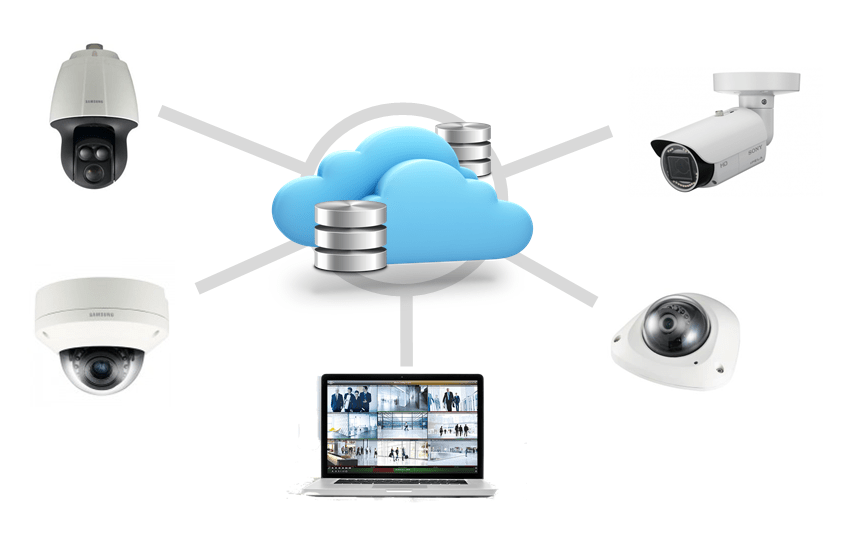
Cloud video surveillance is a video management approach where camera footage is encrypted at the edge, transmitted to secure cloud infrastructure, and made available for live viewing, recording, search, and AI analysis from any authorized device — phone, tablet, browser, monitoring center workstation. Unlike a traditional DVR or NVR system, there is no on-site recording appliance that can fail, be stolen, drown in a flood, or fill up its hard drive.
How it differs from traditional DVR/NVR systems
A legacy CCTV install puts a recording appliance in a closet at the site. Footage stays local until someone physically retrieves it. The system depends on power, on the box working, and on someone remembering to check it. If the site is destroyed, so is the footage — exactly when you need it most.
Cloud video surveillance inverts that model. Cameras (or small bridges connected to cameras) push encrypted video off-site continuously. Footage is retained in geo-redundant data centers. Authorized users can view live and recorded video from anywhere, search across cameras and sites in seconds, and apply AI to entire archives rather than one camera at a time.
Why Texas businesses are moving to cloud VMS
Five operational realities are driving the migration in Texas specifically.
Multi-site visibility from one pane of glass
Retail chains, restaurant groups, multifamily portfolios, and energy operators rarely run a single site. Cloud VMS gives operations leaders a single login that spans every camera at every property — searchable, sharable, exportable. A loss-prevention director in Dallas can review an incident at a San Antonio store in seconds without driving anywhere.
Hurricane, flood, and power resilience
The Texas Gulf Coast loses power and floods regularly. An on-site DVR sitting in a back office is a single point of failure. Cloud-recorded footage survives the building. When a site goes back online after a storm, the cameras reconnect and resume; the historical footage was never at risk.
Mobile access for executives and on-call staff
Property managers, store managers, and on-call security staff need to look at live video from a phone — at 2 a.m., from a hotel room, from a partner’s wedding. Cloud platforms make this trivial; legacy systems make it painful and often impossible without VPNs and port forwarding.
Storage and retention without local hardware
Retention requirements (30, 60, 90, or 365 days) drive DVR storage costs and maintenance. Cloud retention scales without buying hard drives, and footage is always available — not locked behind a failing appliance.
AI analytics across the whole estate
Modern cloud VMS platforms apply AI to every camera — vehicle detection, person detection, loitering alerts, license plate recognition, intrusion zones — in a way that’s simply not feasible on a legacy NVR running on a 2017 box.
Op6’s managed cloud video surveillance offering
Op6 is a full-service provider, not a reseller. We handle:
- Site assessment — walking the property, identifying coverage gaps, designing camera placements that match the actual threat picture.
- Equipment selection — cameras, bridges, mounts, network gear, lighting, and edge AI hardware matched to the environment (interior retail, outdoor industrial, perimeter, vehicle gates).
- Installation — licensed technicians running cable, mounting cameras, configuring network and platform, and commissioning the system.
- Cloud platform configuration — user roles, retention policies, AI rules, alert routing, integrations.
- 24/7 monitoring — live human operators in our monitoring center watching alerts, verifying events, and dispatching response.
- Response coordination — Op6 armed and unarmed officers, local law enforcement, and on-site staff dispatched per pre-agreed protocols.
- Ongoing service — maintenance, firmware updates, camera adds and moves, quarterly reviews.
You get one accountable partner for the entire program. When something goes wrong at 3 a.m., you call Op6 — not a camera vendor, an installer, a software company, and a monitoring service in four different conversations.
Remote video monitoring — how Op6’s monitoring center works
Cameras alone don’t stop incidents. Cameras with AI alone don’t either — AI generates noise, and noise without verification gets ignored. The combination that works is AI-flagged events plus live human verification plus a dispatch protocol, which is how Op6’s monitoring center is built.
The flow of a verified event
- An AI rule triggers — say, a person detected inside an after-hours intrusion zone at a construction site.
- The event lands on a monitoring operator’s workstation within seconds, with the live feed and recent context already loaded.
- The operator verifies — is this a person, an animal, a wind-blown tarp, or a real intrusion?
- If real, the operator triggers the dispatch protocol agreed with the client: a recorded voice-down warning over speakers (“You are on private property, you are being recorded, leave the area immediately”), a call to local law enforcement, dispatch of an Op6 mobile patrol, or a call to the on-call site contact.
- The operator stays on the event until it’s resolved and produces an incident report.
The voice-down is one of the highest-leverage tools in the kit. The vast majority of intruders flee within seconds of being audibly verified as observed. For sites where voice-down isn’t enough, Op6’s armed officers and unarmed security teams provide the physical response layer.
Common Op6 cloud surveillance deployments
Construction sites
Active construction sites are theft magnets — copper wire, tools, fuel, equipment. They also rotate through phases (foundation, framing, MEP, finish) where camera positions need to move. Op6 typically deploys a mix of fixed cloud cameras and mobile surveillance trailers with solar power and cellular uplink, backed by overnight remote monitoring with voice-down and dispatch.
Retail chains and restaurant groups
Loss prevention, slip-and-fall verification, employee safety, and operational coaching all rely on consistent, searchable video across every location. Cloud VMS gives regional managers and LP teams the unified view they need.
Multifamily and HOA properties
Garages, mailrooms, amenity areas, and entry points carry liability and resident-experience implications. Cloud video plus license plate recognition at gates dramatically reduces incident frequency and accelerates resolution when incidents do occur.
Healthcare campuses
Hospitals, clinics, and medical office buildings face workplace violence concerns, drug diversion, parking-lot incidents, and HIPAA-adjacent privacy considerations. Op6 designs healthcare deployments with appropriate masking, role-based access, and retention.
Oil, gas, and energy infrastructure
Remote pad sites, compressor stations, yards, and saltwater disposal facilities are exposed targets, often beyond the reach of local law enforcement response. Cloud cameras with cellular or satellite backhaul, paired with mobile surveillance trailers and remote voice-down, change the economics of protecting these assets.
K-12 and higher education
School districts and universities require robust retention, granular role-based access, and integration with access control. Cloud VMS supports the auditability these environments require.
Mobile surveillance trailers + cloud VMS
For sites that don’t justify a permanent install — temporary construction, special events, vacant property between leases, parking lots with seasonal issues — Op6’s mobile surveillance trailers deliver the same cloud-monitored experience without trenching cable. Each trailer carries multiple PTZ and fixed cameras, solar with battery backup, cellular uplink, on-board AI processing, voice-down speakers, and high-output lighting. They’re delivered, set up, and connected to the same monitoring center that watches Op6’s permanent installs.
AI-enabled features that actually matter
The market is loud about AI. Most of the hype is filler. The features that genuinely change outcomes for Op6 clients are:
- Person detection — distinguishing humans from animals and weather, dramatically reducing false alerts.
- Vehicle detection — including direction of travel, dwell time, and vehicle type.
- License plate recognition (LPR) — at gates, exits, and chokepoints, with hot-list integration.
- Loitering and intrusion zones — virtual perimeters that trigger only when a person dwells in a defined area for longer than a defined time.
- Object-of-interest search — “find every red pickup truck across all 14 sites between 10 p.m. and 6 a.m. last Tuesday.”
- Behavioral anomalies — fights, falls, crowd formation, rapid movement.
You can read more about the broader technology stack we deploy on our our technology page.
The platform partner question — a brief, factual note
Op6 deploys enterprise cloud video platforms — including the Eagle Eye Networks VMS — to power our 24/7 monitoring services. We selected these platforms after evaluation against the operational requirements of Texas multi-site clients: bandwidth-efficient encoding, true cloud architecture, open APIs, AI capability, retention flexibility, and security posture. From a client’s perspective, this is a tooling choice rather than a vendor choice; Op6 handles selection, install, configuration, monitoring, and response so you have one accountable partner. You don’t manage logins to a video vendor — you manage a relationship with Op6.
Compliance and retention
Texas has its own framework for video surveillance. Key considerations Op6 builds into every deployment:
- Retention windows — most clients standardize on 30 or 60 days for general surveillance, with longer retention for incident clips and specific high-risk zones.
- Texas privacy considerations — recording in restrooms, locker rooms, and other expected-privacy areas is prohibited. Audio recording requires consent under Texas wiretap law for two-party scenarios.
- Workplace notice — appropriate signage and policy disclosures.
- CJIS — for clients touching law enforcement data (school districts working with SROs, government facilities), platform CJIS posture matters.
- HIPAA-adjacent — healthcare deployments use role-based access and masking to keep video out of inappropriate hands.
- Industry-specific — PCI for retail back-of-house, NERC-CIP for energy infrastructure where applicable.
Op6 documents retention, access, and disposal policies for each client engagement so audits and discovery requests are answerable on the first call.
Total cost of ownership: cloud vs. on-premise
For most Texas operators, cloud VMS is the cheaper option once you account for the full picture, not just the initial hardware quote.
On-premise costs include: the recording appliance, hard drives, replacement drives every three to five years, the appliance refresh every five to seven years, networking gear, UPS for the appliance, the technician hours to maintain it, the lost footage when the appliance fails, the lost footage when the building floods, and the loss of AI capability as the box ages.
Cloud costs include: per-camera monthly subscription, retention tier, and an edge bridge or smart camera. Capital expenditure is dramatically lower; opex is predictable; capability stays current as the platform evolves; and the operational risk of an appliance failure simply doesn’t exist.
For a 16-camera retail store kept for five years, cloud typically comes in 15% to 30% cheaper on TCO, before counting the operational gains. For a 200-camera multi-site portfolio, the gap widens further.
Frequently asked questions
What is cloud video surveillance?
Cloud video surveillance is a model where camera footage is recorded, stored, and accessed through cloud infrastructure rather than on a local DVR or NVR. It enables remote viewing, AI analytics, and resilient retention.
Is cloud video surveillance secure?
Properly deployed cloud VMS uses end-to-end encryption, role-based access, audit logging, and SOC 2-aligned platform security. In most cases it’s significantly more secure than a DVR sitting in an unlocked closet.
Does Op6 install the cameras or just monitor them?
Both. Op6 designs, installs, configures, monitors, and maintains the system as a single accountable program. We don’t hand off between vendors.
What happens when an alert fires after hours?
An Op6 monitoring operator verifies the event live, then triggers the agreed dispatch protocol — voice-down, law enforcement, mobile patrol, or on-call site contact — and stays with the event until resolved.
Do I need internet at the site?
Most permanent installs use the site’s existing internet with a small bandwidth allocation. Remote sites can use cellular or satellite. Op6’s mobile surveillance trailers include cellular uplink and run independently of site infrastructure.
How long is footage retained?
Retention is configurable. Most clients run 30 or 60 days general retention with longer retention for flagged incidents. Compliance-driven environments (education, government, healthcare) often run 90 to 365 days.
Can I keep my existing cameras?
In many cases, yes. ONVIF-compatible cameras can often be brought into a cloud platform via a bridge appliance. Op6 evaluates existing infrastructure during the site assessment.
How does pricing work?
Pricing is per camera per month for the platform plus retention, with a one-time install. Monitoring services are priced separately based on hours and dispatch protocols. Op6 quotes the entire program — install, platform, monitoring — as a unified scope.
Ready to Protect What Matters?
Get a free consultation with the Op6 Security team. No obligation. We will assess your needs and recommend the right protection plan for your situation.